


Give your old iMac a new life.Use your old iMac as a second monitor for your Mac.
Version 0.9.0 · Free · Updates itself


Your old iMac, back at work.
Can it be a second screen?
Yes! Drag a window onto it.
A second screen
Your Mac sees the iMac as an extra display. Drag windows onto it.
Do I need to buy anything?
Nope. A cable is just faster.
Wi-Fi or cable
Nothing to buy. An Ethernet or Thunderbolt cable makes it faster and sharper. Which cable?
Do I set it up every time?
Once. After that it reconnects.
Connects by itself
Pair once with a code. After that it just reconnects.
Three steps. Two minutes.
- 1
Download both apps
Encore on your Mac, Encore Receiver on the iMac.
- 2
Type the code
Click Connect next to your iMac and type the 4-digit code it shows.
- 3
Done
The iMac is your second screen. Next time it connects by itself.
Works with every Intel iMac from Late 2009 to 2020.
The iMac needs macOS 10.13 High Sierra or later. Your Mac needs macOS 14 Sonoma or later.
New in 0.9.0.

New in 0.8
The notch: quick control
Move your pointer under the notch and Encore drops down. Screen, StandBy, sound, camera, connection and picture, each one click away. On a Mac without a notch, press Control-Option-E.

New in 0.8
Connect in a moment
Open the panel and Encore finds your iMac and connects by itself, over the cable first when there is one. A green check, and the iMac is your second screen. No codes, no settings.

New in 0.8
Sound, camera, mouse and keyboard
Your Mac's sound plays on the iMac speakers, the iMac camera and microphone work as your Mac's webcam, and the iMac keyboard and mouse control your Mac. One switch each.
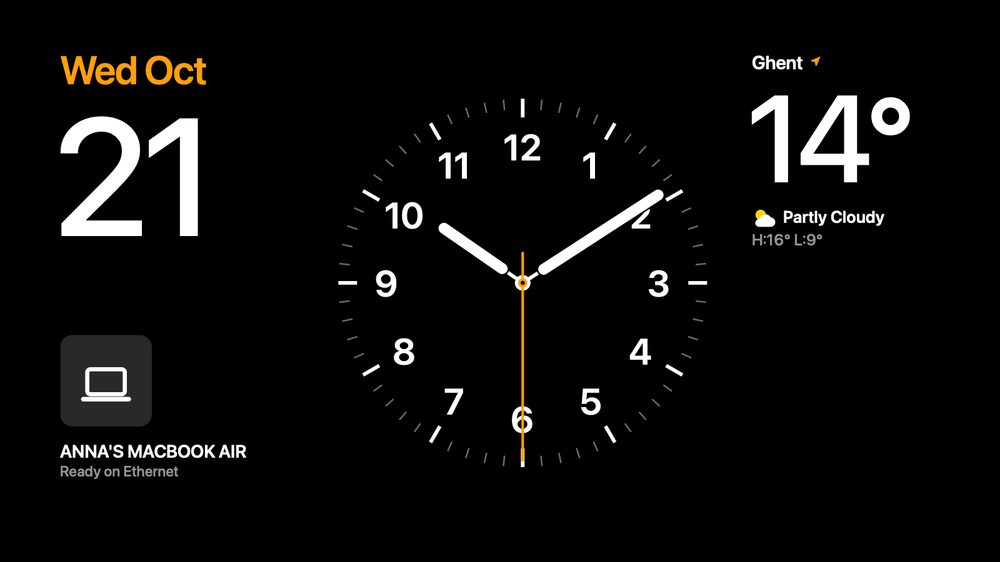
StandBy on the iMac
When it's not a screen, the iMac shows a clock, weather and calendar. Pick a face on your Mac.

Several iMacs at once
Each iMac gets its own row: monitor or StandBy, Sharp or Smooth, Cable or Wi-Fi, sound and camera.

Keyboard and mouse
Control your Mac with the keyboard and mouse plugged into the iMac.

Sound
Play your Mac's sound on one or more iMacs, all at the same moment.
Free during early access.
No account, no ads, no tracking. Both apps update themselves.
Questions
Is Encore really free?
Yes, Encore is free during early access. If that changes, you'll hear it in the app well in advance. No account, no ads, no tracking.
Which iMacs work?
Every Intel iMac from Late 2009 to 2020 with macOS 10.13 High Sierra or later. 2007 to Early 2009 (OS X 10.10 or 10.11): Encore Receiver Legacy. Look up yours on the compatibility page.
Which Mac do I need?
Any Mac on macOS 14 Sonoma or later: a MacBook Air, MacBook Pro, Mac mini, Mac Studio or a newer iMac.
Do I need a cable?
No. Wi-Fi works without anything. A cable is optional and faster: Gigabit Ethernet, or Thunderbolt if both Macs have it. Which cable to buy.
Why does macOS warn me the first time?
Encore is not registered with Apple, which costs a yearly fee. macOS asks once; the install guide shows the clicks.
Does my screen go over the internet?
No. The picture only travels between your Mac and your iMac, over your own network or cable. There is no account and no Encore server.
Give your old iMac a new life.
Two free apps: one for your Mac, one for the iMac.
Version 0.9.0 · Free · Updates itself