The 27 dB problem: why second-screen text looks soft
Black text on a streamed screen looks fine. Links, syntax colours and red warnings don't, and more bitrate never fixes it. We measured why, and what does fix it.
Encore team · · 5 min read
Any tool that sends your screen as ordinary H.264 or HEVC video halves the colour resolution before the encoder even starts. That is called 4:2:0 chroma subsampling, and in our measurements it caps coloured text at about 27 dB of accuracy on the glyphs, whatever the bitrate. Black text survives; red, blue and grey text gets soft edges and colour fringes. The fixes are to send still parts of the screen as exact pixels, or to use a 4:4:4 format such as ProRes 4444, which measured 51 dB on the same text.
What you are looking at
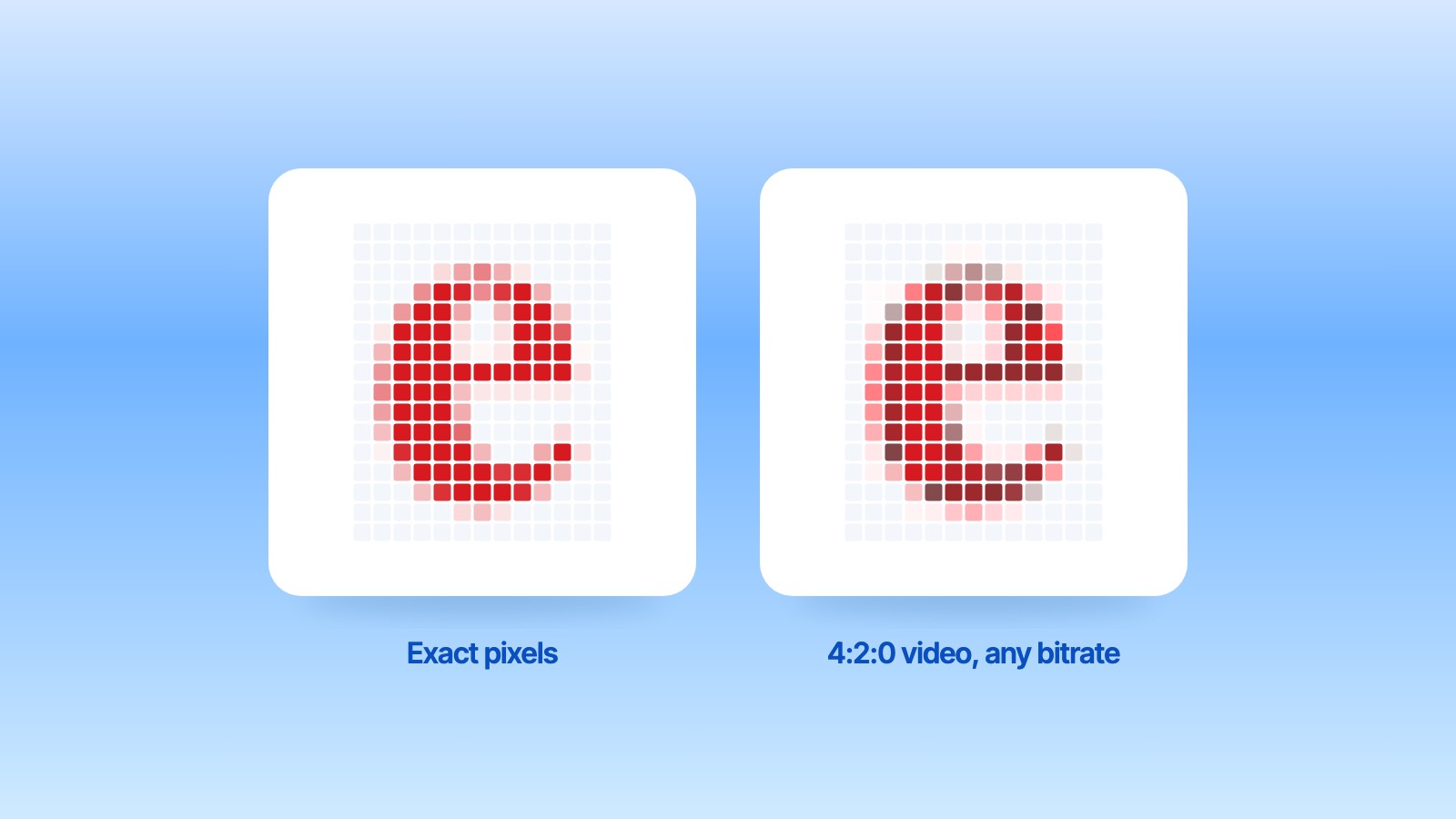
The picture at the top is one red letter, drawn at 24 pixels and enlarged until you can count them. On the left every pixel is as it was drawn. On the right the same pixels went through the 4:2:0 conversion that H.264 and HEVC use, with no encoder at all: the edges turn dull and pink, and the dark core bleeds. Below is the same test on 11-point text from our benchmark, rendered by macOS's own text engine and enlarged five times. Look at "Cursor" and "Receiver": the colour runs over the edges and the letters lose their snap.
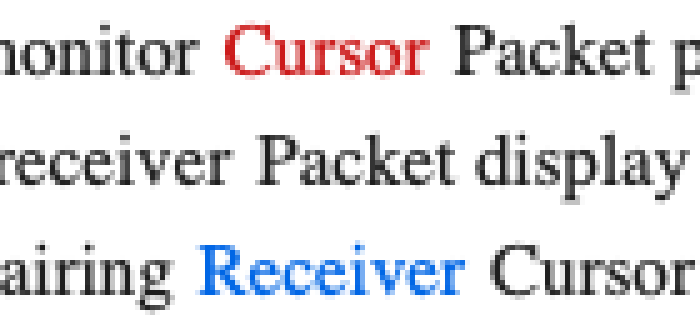
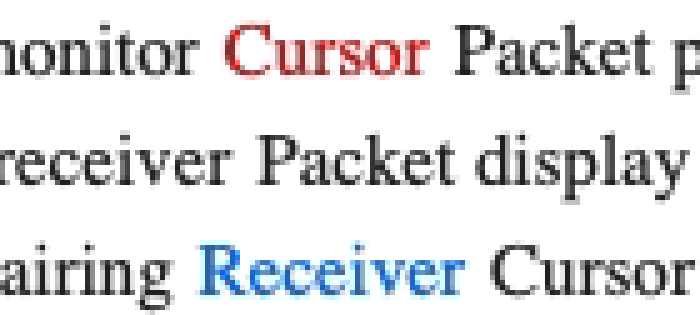
We made both crops from the benchmark's own render with the standard BT.709 conversion, the same round trip as the first table below. Try it on a screenshot of your own: the coloured words are where it shows.
What 4:2:0 throws away
A video frame stores brightness for every pixel but colour only once per block of four pixels (two by two). For photos and film that is invisible. Text is the worst case: a red letter is one or two pixels wide, so its colour gets averaged with the white around it. Black text is mostly spared, because it has almost no colour to lose.
Why more bitrate doesn't fix it
We measured this on 11-point text in black, grey, link blue and red, at 2560 × 1440, scoring only the pixels on or next to a glyph. Higher is better; exact pixels would score infinite.
| Format, no encoder involved | Glyph accuracy, colour (dB) | Glyph accuracy, brightness only (dB) |
|---|---|---|
| 4:2:0, what H.264 and HEVC carry | 27.3 | 42.1 |
| 4:2:2 | 29.2 | 43.8 |
| 4:4:4 | 55.7 | 59.8 |
Then we ran real H.264 and HEVC encodes from 5 to 80 Mbit/s. From 10 Mbit/s up, every run landed on the same colour score, 27.2 dB. The brightness score flattened at about 40 dB from 10 to 20 Mbit/s and did not move after that. More bits buy nothing, because the colour was already gone before the encoder saw the frame.
Fix one: exact tiles once the screen is still
Most of a desktop doesn't change most of the time. Encore splits the screen into 64 × 64 tiles and, once a tile stops changing, sends it again as exact pixels, compressed without loss. In the current release this is how still text and interface get pixel-exact on the iMac, on a cable and on Wi‑Fi.
We are testing a stronger version that is not in the current release yet: changes that fit go out as exact tiles in the very frame they happen (typing, menus, small windows), and the rest rides the video and turns exact once it stops. In a loopback test with a dragged 720p window and 5 % packet loss, it used 19 Mbit/s and every tile was exact 0.28 seconds after the screen stopped.
Fix two: ProRes 4444 on a cable
Recent Macs have a hardware ProRes encoder. ProRes 4444 keeps full colour, and on the same text it scored about 51 dB on the glyphs. The worst pixel in a whole 1440p desktop was 3 values off out of 255. That is visually lossless, also while the screen moves. The 4:2:2 flavours of ProRes land on the 4:2:2 ceiling, about 29 dB, so they don't help coloured text.
| Stream | Glyph accuracy, colour (dB) | Worst pixel error (of 255) | Data rate at 60 fps |
|---|---|---|---|
| H.264, any bitrate from 10 Mbit/s | 27.2 | 10–20 Mbit/s for sharp black text | |
| ProRes 422 HQ, 1440p | 29.2 | 133 | 785 Mbit/s |
| ProRes 4444, 1080p | 50.8 | 4 | 651 Mbit/s |
| ProRes 4444, 1440p | 51.1 | 3 | 1064 Mbit/s |
The catch is the data rate. 1080p ProRes 4444 at 60 fps needs about 651 Mbit/s, 69 % of a Gigabit Ethernet link; 1440p needs more than Gigabit can carry, so it needs Thunderbolt or faster Ethernet. That is why we call it Ultra and plan it for cables only. It is built and in testing, not in the current release, and how fast each iMac can decode it still has to be measured on real iMacs.
Fix three, in research: a codec for desktops
Scrolling text is the hard case for exact tiles, because everything moves. We prototyped a codec that recognises tiles that only shifted and sends a short instruction instead of pixels. On our test scenes, pixel-exact scrolling text needed 6–10 Mbit/s, where H.264 used 17–25 Mbit/s for the same frames and was still 4:2:0. It is a research result, not a feature yet.
How we measured
All numbers come from our own benchmarks on an Apple M4 Mac on macOS 26.5, in October 2026, on synthetic desktops with real 11-point system-font text drawn by Core Text, scrolling 3 pixels per frame. Accuracy is PSNR measured only on glyph pixels, the ones where sharpness shows. The tools and raw data are kept with the Encore source. These are measurements of picture quality, not of delay; we will publish delay separately, per iMac model, once it is measured on real iMacs.
If you want to compare second-screen tools yourself, open a page with coloured links, zoom into a screenshot of the second screen and look at the edges of the blue and red words.
To check which iMac you have and what it can do, see the year-by-year guide, the compatibility page and the cable guide, or download Encore.
Why does text look blurry on my second screen app?
Most likely because the screen is sent as H.264 or HEVC video in 4:2:0, which keeps colour at a quarter of the resolution. Coloured text gets soft edges and fringes that no bitrate removes.
Does a higher bitrate make text sharper?
Up to a point. In our tests brightness detail stopped improving at about 10 to 20 Mbit/s, and colour accuracy on text was stuck at about 27 dB at every bitrate from 10 Mbit/s up.
Is HEVC sharper than H.264 for text?
Not in our measurements. Both carry 4:2:0, and HEVC needed about 40 Mbit/s to match H.264 at 20 Mbit/s when scrolling.
What does 4:4:4 mean?
Every pixel keeps its own colour. 4:2:0 keeps one colour per block of four pixels, 4:2:2 one per pair.
Does Encore send exact pixels?
For still parts of the screen, yes: tiles are sent again without loss once they stop changing. Moving content still rides H.264 in the current release. Exact tiles during motion and ProRes 4444 on a cable are in testing.